Drawing with you, stroke by stroke.
Turn a photo into a 9-step drawing lesson, with a voice that talks you through it. Portraits, caricatures and landscapes, on real paper, at your own pace.
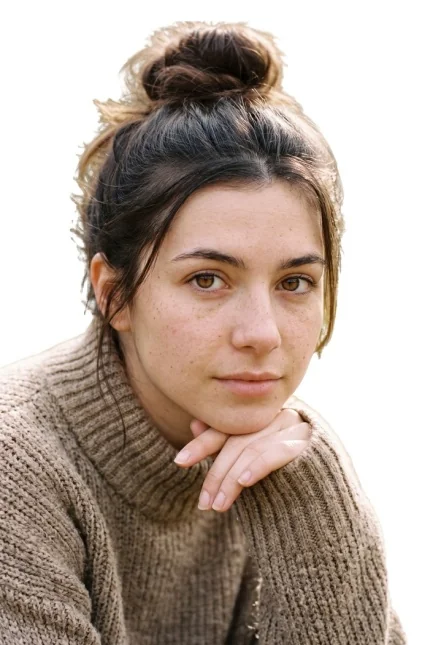
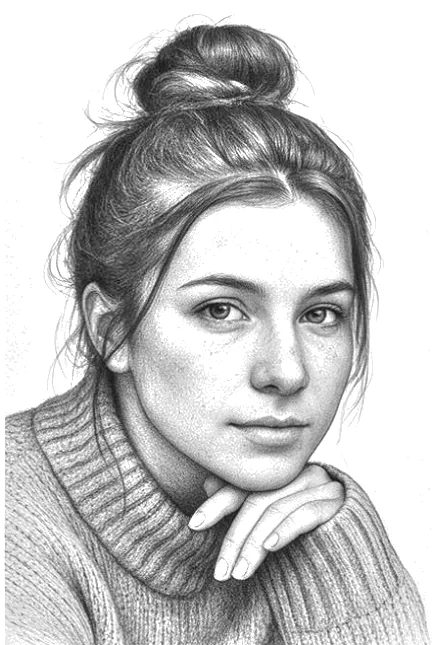
Your photo becomes a lesson.
Here a portrait photo becomes 9 pencil steps, with a voice guiding you on real paper. Caricatures and landscapes are taught the same way.
Why Loomist
Every step builds on the last.
No redrawing, no magic jumps. You only ever add what’s new.
A voice that has looked at this face.
It talks about the tilt of this head and the space between these eyes, not faces in general.
Paper and pencil.
The screen is your guide, not your canvas. You keep the drawing.
Who it’s for
You stopped drawing at twelve.
And always meant to go back. Loomist starts where you are, with shapes anyone can draw.
You sketch, but faces stump you.
Learn the structure behind a likeness, the Loomis way, on the faces you actually want to draw.
You want to make your friends laugh.
Turn their photo into a caricature. It starts from the same structure as a portrait, then pushes what makes the face theirs.
You’d rather draw the view.
Turn a landscape photo into an ink and wash sketch: pencil guides first, then ink lines, then grey washes.
Be first to draw.
Join now and your first lesson from your own photo is free at launch.
Draw together
Invite friends to earn more lessons made from your own photos.
- You join
- 1 free lesson
- 1 friend joins
- 2 free lessons
- 3 friends join
- 3 free lessons and a place in the beta
- 5 friends join
- Founding Artist badge and a discounted subscription
A free lesson is one made from your own photo, up to 3 per person. A friend counts once they confirm their email. The app’s lesson library is open to everyone. You get your link right after you confirm.
Questions
When does Loomist launch?
In the new year, on iPhone and Android. Waitlist members hear first, and some get into the beta before launch.
What can I draw?
Portraits, caricatures and landscapes. A portrait is a pencil likeness. A caricature exaggerates what makes a face recognisable. A landscape becomes an ink and wash sketch. Every lesson has 9 steps.
Do I need to be good at drawing?
No. The first steps are simple shapes and light guide lines. If you can draw an oval, you can start.
What do I need?
Paper, a pencil (an HB is enough to begin), an eraser and your phone to follow along. For landscapes, add a fine black pen and some grey wash: watered-down ink or watercolour.
What happens to my photo?
Your photo is used only to make your lesson. We don’t sell it, and we don’t use it to train AI models. The full details will be in the app’s privacy policy at launch.
How much will it cost?
Free to start. Waitlist members get their first lesson free. Plans and prices will be shared at launch.
Which languages?
English and Spanish at launch.
How does the referral reward work?
After you confirm your email, you get a personal link. When 1 friend joins with it and confirms, you get a second free lesson from your own photo. At 3 friends you get a third, the most you can earn. At 5 friends you get the Founding Artist badge and a discounted subscription. Your lessons are added to your app account when you sign up with the same email. Use them within 30 days of signing up.